General
Match Color Lab is a browser-based image editing platform that lets you transfer colors from one image to another professionally. It uses advanced colorimetry algorithms (Lab space) so the colors of a reference photo are applied to your image while keeping it natural and detailed. It also includes effects, presets, levels adjustment, rotation, crop, perspective and more editing tools.
Match Color Lab solves the problem of making two images share the same color palette. This is useful for:
- Photography: unifying the tone of a report or photo shoot.
- Graphic design: adapting images to a specific visual identity.
- Video editing: preparing key frames with consistent color.
- Photo restoration: correcting the color of old photos using a reference.
- Film & post-production: matching the palette between shots of the same scene.
The process is simple:
- 1. Upload your image (or drag it to the indicated area).
- 2. Upload a reference image whose colors you want to apply.
- 3. Adjust the color transfer intensity with the slider.
- 4. Add effects, presets or extra adjustments if you need them.
- 5. Export the result in PNG or JPG.
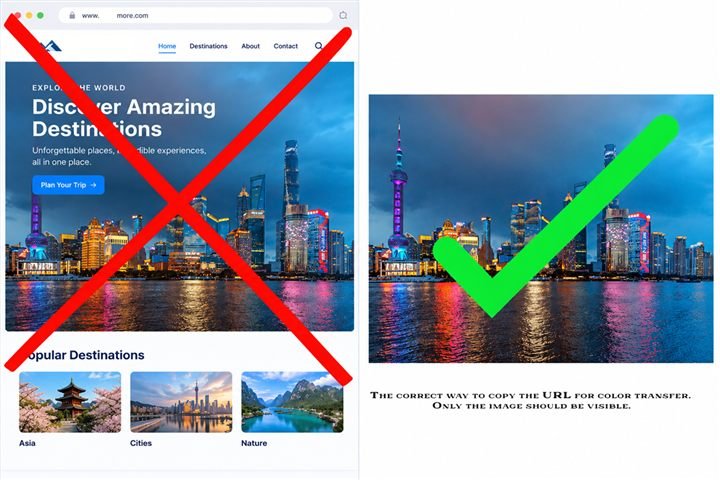
Because that URL is a web page, not an image. The From URL field needs the file's direct link. Right-click the photo → Copy image address and paste that address instead.
We recommend royalty-free stock sites like Pixabay, Unsplash or Pexels.
A URL may be technically unusable when the image requires permissions, expires, is protected, or doesn't exist as a directly accessible file. That's not a Match Color Lab error. Try other options.
Match Color Lab was created for PC use but is optimized for mobile devices and tablets. To keep editing smooth, on phones or tablets your image is automatically reduced on load and export comes out at full resolution (it may take a few seconds to generate). To use on mobile, keep your device in landscape orientation.
System requirements. A good internet connection is essential.
PC (desktop/laptop) — ideal:
System requirements. A good internet connection is essential.
PC (desktop/laptop) — ideal:
- OS: Windows 10/11, macOS 12+ or modern 64-bit Linux.
- RAM: 8 GB+ (16 GB if you edit 40MP RAW files).
- CPU: 4+ cores (effects run in a Web Worker; WebGPU accelerates if your GPU is compatible, otherwise it uses the CPU).
- Updated browser: Chrome/Edge 110+, Firefox 110+ or Safari 16+ (JS modules, Web Workers, WebAssembly for RAW).
- Display: 1440px+ wide to see the full panel without scrolling.
- Mid-high range 2021+: iPad (A12+/M chip) with Safari 16+, or Android with 4 GB+ RAM and updated Chrome.
- 12MP working cap, 1800px preview, capped DPR — smooth without cutting export quality.
- Avoid: 2 GB RAM tablets or Android 8 or lower (the browser may kill the canvas with large photos).
- Android 11+ / iOS 16+, 4 GB+ RAM, updated Chrome/Safari.
- On phones the hero video is hidden and processing runs on a lightweight proxy: it works even on mid-range devices, with a final full-resolution pass on export (slower, this is normal).
- Photos up to 40MP; heavy RAW is better on PC.
- Connection: only needed to load the app and Stripe; editing is 100% local.
- Realistic limit: pre-16 iOS Safari or 2 GB RAM = editing possible, but with automatic reductions.
Yes. It may work, but perhaps not with total smoothness. Remember that a good internet connection is very important. Use the free plan to try it on different devices.
Account & registration
Yes. You need a free account to use Match Color Lab. Registration is quick: you only need an email and a password (minimum 6 characters). With your account you can access from any device and your settings are kept.
On the login screen, click «Forgot your password?». Enter your email and you will receive a link to create a new password. The link expires for security. If you don't receive the email, check your spam folder.
Yes. Click your name at the top of the editor to open your profile. From there you can edit your name and change your password instantly.
Plans & pricing
Yes. The Free plan is completely free and gives you 20 minutes of daily usage, with full editor, RAW and limited presets. If you need unlimited time, paid plans exist.
- Free — Free. 20 min/day. Full editor, RAW, limited presets and 10-step history.
- Basic — €29/year. Unlimited time, limited presets, 20-step history and support. No RAW, favorites or saved settings.
- Premium — €45/year. Everything unlimited: RAW, unlimited presets and favorites, own presets, 50-step history and VIP support.
When your daily time runs out, the editor locks until the next day. You won't be able to process images. If you need unlimited time, upgrade your plan. Basic and Premium users don't have this limitation.
Yes. To do so, contact us by email and we will provide you with a payment link indicating the amount to pay, which will be the prorated amount of what has been consumed so far and the time until the end of the year.
Features
Match Color Lab includes:
- Color transfer: apply one image's color palette to another. From local or URL.
- Zonal lightness adjustments.
- Selective color use (Pick Color) without affecting lightness.
- Image effects: brightness, contrast, saturation, blur, sharpness and more.
- Levels: black, white and gamma adjustment.
- Presets: 12 per photo plus one extra regeneration on Free and Basic; unlimited + favorites and own on Premium.
- Transformations: rotation, flip, crop, vertical/horizontal perspective, free rotation, scale.
- Split view: compare original and result side by side.
- History: 10 steps on Free, 20 on Basic and 50 on Premium, with thumbnails.
- RAW support: import camera RAW files (Free and Premium; not included on Basic).
- Export: download in PNG or JPG with adjustable quality.
- 1. Upload your image in the main area (dragging or clicking).
- 2. In the Match Color panel, upload or select a reference image.
- 3. Adjust the intensity slider (0% = no effect, 100% = full transfer).
- 4. The result applies in real time. You can change the reference or intensity at any time.
- 5. Use the split view (top-right button) to compare before/after.
Color transfer works in the Lab color space, which separates lightness from color. This lets reference colors apply without altering the details or exposure of your original image. Intensity controls how much of the reference color blends into your image: at 50% you get a subtle result, at 100% the palette replicates more faithfully.
Presets are predefined adjustments that apply effect combinations (brightness, contrast, saturation, etc.) with one click. Each photo includes 12 presets plus one extra regeneration. On the Premium plan they are unlimited and you can save your own custom presets to reuse them. Presets apply before color transfer in the processing pipeline.
Yes. History stores up to 10 steps on Free, 20 on Basic and 50 on Premium. You can undo (Ctrl+Z) and redo (Ctrl+Y) any action. The history panel shows thumbnails of each step so you can jump to a specific point. If you make a change after undoing, later steps are removed.
- Input: PNG, JPG, JPEG, WebP and RAW files (CR2, NEF, ARW, DNG, RAF, ORF, RW2, PEF and more) on Free and Premium. The Basic plan does not include RAW.
- Output: PNG (lossless) and JPG (quality adjustable from 1% to 100%).
RAW files
A RAW file is the unprocessed image captured directly by your camera sensor. Unlike JPG, it keeps all light and color information, allowing much more precise editing. Match Color Lab supports RAW from major brands: Canon (CR2), Nikon (NEF), Sony (ARW), Fujifilm (RAF), Olympus (ORF), Panasonic (RW2), Pentax (PEF) and DNG standard.
No. RAW file editing is included on Free and Premium. The Basic plan does not include RAW files. You can upload a RAW file by dragging it or using the «Open RAW» button in the editor panel.
Technical issues
Try these steps:
- Make sure the image is in a supported format (PNG, JPG, WebP).
- If the file is very large (+20MB), reduce it before uploading.
- Check your internet connection.
- Try another browser (Chrome, Firefox, Safari, Edge).
- If the problem persists, clear your browser cache.
Processing time depends on:
- Image size: bigger images take longer. Images under 4000px per side are recommended.
- A JPG will always run smoother than a RAW.
- Device: computers with more memory and faster processors finish sooner.
- Browser: Chrome and Edge are usually faster than Safari at image processing tasks.
- Reload the page and try again.
- Check your internet connection.
- Try another browser or device.
- If the error persists, contact support by emailing soport@matchcolorlab.com with a description of the problem and a screenshot if possible.
Privacy & security
Yes. At Match Color Lab we take privacy seriously:
- Your images are not stored on our servers permanently. They are processed and automatically deleted.
- Your password is encrypted with hash (bcrypt) and not even accessible to us.
- Sessions are managed securely.
- We don't sell or share your data with third parties.
- Account data (email, name, plan) is stored in a protected database and only used to run the service.
No. Your images are processed and discarded. We don't make copies, don't store them in the cloud and have no access to their content. Editing happens in your browser or on the server temporarily and securely.
Legal
Before subscribing, you can try the application for free. Once a purchase has been made, changing your mind or stopping use of the application does not, by itself, constitute a reason for a refund. Cancelling prevents future renewals but does not entitle you to a refund for the period already subscribed. Exceptions apply for breaches, unauthorized charges or billing errors. Read the full policy →
Match Color Lab offers annual plans. You can try the application before paying. The process includes plan selection, acceptance of terms and payment. Duration is 12 months from activation. Payments are processed through external providers. Read the full terms →